Let's start using Accentis Enterprise
Before you do anything … where do you get help?
Help can be found in this guide and (coming soon) associated help videos. You can also get help directly from your Accentis Administrator. All Accentis Enterprise installations have a nominated Accentis Administrator.
Help options


Before you start Accentis Enterprise- log in to the “server” for remote desktop users
Many Accentis Enterprise installations require that you first log in to a server computer to run Accentis Enterprise. For these installations, launch via a Remote Desktop icon, such as:

Talk to your Accentis Administrator if you are not familiar with logging in to your server in this way or whether or not you need to use this method.
Before you start Accentis Enterprise – make sure you are not already logged in
You don’t want to be logged twice. Before logging in, check your not already logged in. The Windows task bar shows programs already running.
If this is the first time you have run the program for the day, there will be no need to check if it is already running.
 Starting the Accentis Enterprise program
Accentis Enterprise is started by double-clicking the Accentis Enterprise icon on your desktop. The icon will look like this:

Logging in to your system
The first screen displayed is the Login screen. You’ll need to know:
- Your database name
- Login name (username)
- Password
If unsure, your Accentis Administrator can assist
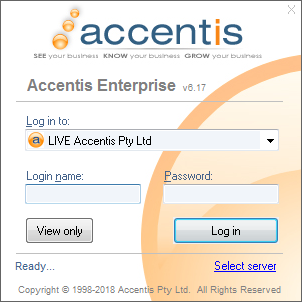
To log in to your system:
Log in to
- Select the database from the Log in to list
- Your company will usually only have one database - “LIVE”
- During implementation you may also have Test or training databases
- If unsure, your Accentis Administrator can assist
Login name
- Enter your Login name
- You will have been given a login name by your Accentis Administrator
If multiple people use the same PC, check the Login name field as the last user to log in will be displayed by default.
Password
- Enter your password
- This is CASE sensitive, so ensure that you do not have CAPS LOCK on accidentally when you log in
Click the Login button or press ENTER on the keyboard.
Process
- Select database from drop-down
- Enter your Login name
- Enter your Password
- Click the Log in button
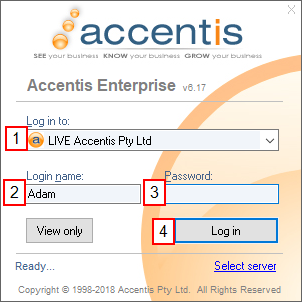
- Log in to:
- Normally you will only have access to one database: LIVE
- During implementation you may have access to a DEMO or TEST database
- If unsure, speak to your Accentis Administrator
- Login name:
- It is provided to you by your Accentis Administrator
- Accentis password:
- It is case sensitive
Additional tips:
- Remember that your login name might be different to other login names you already use for your computer
- If you share your computer with other people, the last person's name might already be in this field
After a short delay, the Accentis Enterprise main window will be displayed as follows (it may vary slightly depending on your PC and your company setup):
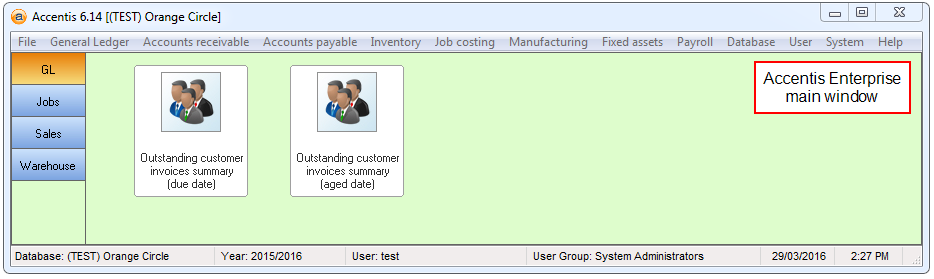
If any errors are displayed or you do not see this window, please read the Frequently Asked Questions at the end of this section for help.
Logging in more than once
It is possible to run multiple Accentis Enterprise sessions on the same PC at the same time, either logged in as the same or different users.
What's the implication?
Each time you run Accentis Enterprise and log in, you occupy a user license. Your company will only have a certain number of users that can all log in at the one time so only log in when you need to and don’t log in more than once unless necessary.
If you do need to log in to Accentis Enterprise while you are already logged in, simply start up Accentis Enterprise from the icon again.
If you need to know about user licenses, speak to your Accentis Administrator
Logging out of Accentis Enterprise
To log out of Accentis Enterprise:
- Click on the X at the top right of the main window, or
- Select File > Exit from the main menu
If you have any forms open, they will be closed automatically unless they are in Add or Edit state. In this case, a message will appear telling you that Accentis Enterprise cannot shut down, because you have some windows open.
It is good practice to shut down your Accentis Enterprise session whenever you are not using it so that:
- Other users can log in to the system
- Other people can’t go to your computer and use your Accentis Enterprise sessions to view or modify data they are not supposed to.
- You don’t accidentally leave it logged in overnight which can prevent backups from occurring
Stop: Never shut down Accentis Enterprise by using the Task Manager or CTRL-ALT-DELETE. You must always wait for the program to exit by itself. If you forcibly terminate the program using the task manager, you may lose some or all of your data.
Logging in as another user – changing login
Sometimes you may be set up to access Accentis Enterprise by different user names with different levels of permissions. In this case, you may need to change logins to another user.
If you are already logged into the system:
- Select File > Change login. This will log you out and take you to the login screen ready for a new login
- Log in again, just as if you have started the program again
Security considerations – your password identifies YOU
Every user will have their own username and password to log in to Accentis Enterprise. This uniquely identifies you as a user and every action that is taken or data that is viewed is logged in an audit trail for viewing by a system administrator. Therefore, you must observe the following basic rules:
- Do NOT let anyone else know your password
- Do NOT use anyone else’s username or password to use the system
- Change your password regularly, especially if you think someone has discovered it
- Choose strong passwords – using your login name as your password is not secure
- Letting someone know your password will only ever create problems for YOU, not them!
Frequently asked questions about starting and stopping Accentis Enterprise
What do I do if I can’t locate the Accentis Enterprise icon to start up?
If you can’t locate your Accentis Enterprise icon, firstly make sure that you have had a good look. It may be hidden by other icons or may have been moved to a different place on your desktop. An icon for Accentis Enterprise is also placed in Start > Programs, so use this one if no Desktop icon exists. If you still can’t find it, contact your Accentis Administrator for help.
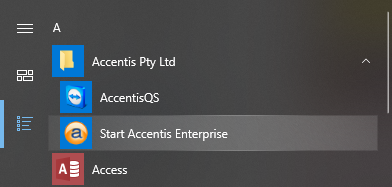
What if my startup icon has different text on the bottom of it?
Depending on the way Accentis Enterprise was installed on your PC, it is possible that the text on the bottom of your Accentis Enterprise icon is different to that shown in this guide. You should only have one Accentis Enterprise icon on your desktop and the one that you find there is the one you should use. When in doubt, contact your Accentis system administrator.
When I run Accentis Enterprise, a security warning box appears – what’s that about?
Some versions of Windows will display security warnings about programs when they run telling you that there may be a risk when running the program. Providing you are only running the Accentis Enterprise icon provided on your desktop, you should click OK or yes to these warnings. If in doubt, contact your Accentis Administrator.
What do I do if I try to start Accentis Enterprise and I don’t get the login screen?
If you don’t see a login screen even after you have clicked on the Accentis Enterprise icon. Try double-clicking the icon again and if there is still no result, you should contact your Accentis Administrator.
What do I do if the database I want is not in the list?
If the database you are looking for or that you usually use is not in the list, you should contact your Accentis administrator.
What if I forget my user name or password?
If you forget your username or password, you should contact your Accentis Administrator who will issue you with a new password.
What can I use as my password?
You can use anything you like for your password, but you should observe your company’s guidelines on password selection. It is not sensible to use your user login name or your first name or last name as your password. You may use the same password as the one you use to log in to Windows each day.
What happens if the system tells me my password is still wrong?
If you get an error indicating that your password or username is not correct, double check that you:
- Have selected the correct database
- Are using the correct user name
- Do not have CAPS LOCK on
If you still cannot log in, contact your Accentis Administrator
What do I do if I have typed everything in correctly and I still can’t log in?
If you can’t log in and you have double-checked that everything has been entered correctly, contact your Accentis administrator
What does it mean when I try to log in and Accentis Enterprise says all licenses are in use?
Your company will have purchased a certain number of Accentis licenses that allows only a specified number of people to be using the system at the same time. If you cannot log in to Accentis Enterprise because all licenses are in use, you may either try again later or contact your Accentis Administrator who may be able to log users out who are not currently using the system
What happens if I log in and I can’t see the main Accentis Enterprise window?
If you can’t see the main Window, it may be because it is in a different place than you are used to (if you have changed screen resolutions or display settings) so double check that it is not displayed and that it is not hidden behind other windows. If you still cannot locate the main window yet you logged in successfully, contact your Accentis Administrator
What happens if I log in but the main Accentis Enterprise window is too small or too large?
The main window remembers the location and size the last time you used it, but if this is the first time you have used Accentis Enterprise you may find that the main window is too large, too small or not in the correct position. Simply adjust the size and position like any other program in Windows and it will be saved for next time
Do I have to log out each day?
Yes, at the end of each day you should exit Accentis Enterprise. This ensures that nightly backups and administrative tasks can complete properly. DO NOT ever go home from work and leave Accentis logged in and in the middle of adding or changing a data record. This may prevent important nightly maintenance tasks from occurring and you may also lose your data.
Is there a limit to how many times I can log in and out of the system?
No. You can log in and out of Accentis Enterprise as many times as you need to. You can log out each time you leave your desk if you like and log back in when you return.
Can I log in to Accentis from another PC?
Yes. You can log in to Accentis Enterprise using any PC on which it has been installed and you can use your own username and password. Your own environment (toolbar, colours, form positions) will be displayed regardless of the PC you use.
What happens if my PC crashes or loses power while using Accentis?
Just restart the PC and restart Accentis. If you were in the middle of changing or adding a new record, you will have lost those changes, but every other change you made that day will have been saved. If in doubt, when you return to Accentis Enterprise, check the last thing you did to give you peace of mind.
Can other users tell when I am logged in?
Yes. Certain users and system administrators will be able to see who is logged in to the system, when they logged in and from which PC they are working.